Skip to content
Open receivables

Dunning software for the self-employed

Follow up on open invoices without chasing your clients: Sumaro shows open and overdue invoices, matches incoming payments and prepares reminders or dunning letters in the right context. You decide what gets sent.

  • Due dates in view
  • Prepare dunning runs
  • Match payments
Due dates in view
Prepare dunning runs
Match payments
Controlled approvals
The problem behind the problem

An invoice that’s been sent is not yet a paid job.

When due dates disappear into calendars, inboxes and spreadsheets, friendly reminders quickly go out too late or twice – and you only find out late that money you had already planned with is missing. Sumaro makes the open item visible before it slips out of your working memory.

How Sumaro solves it

See the due date, match the payment, approve the next step.

Step 01

See open items before they get lost in daily work

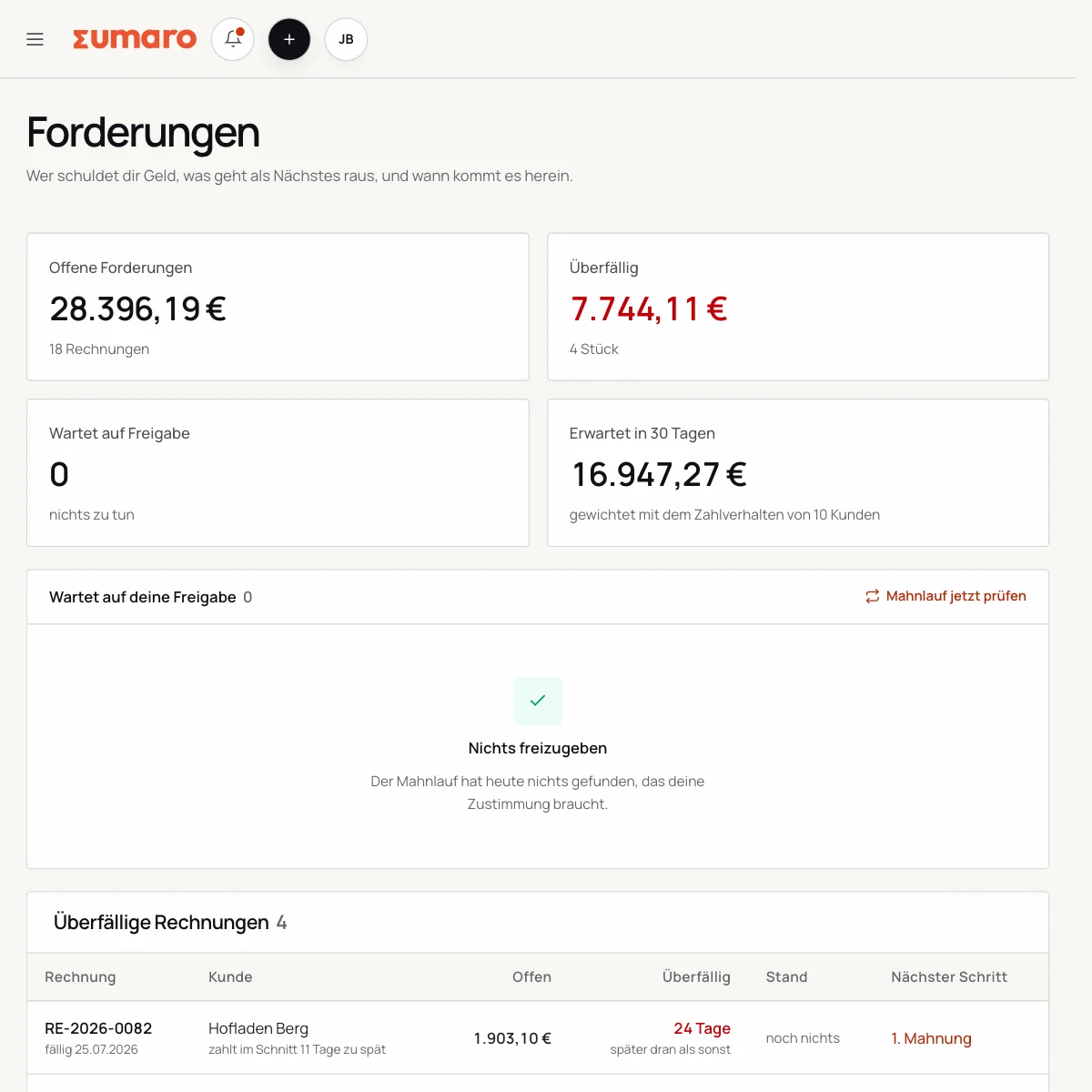
A clear list shows you which amount is open, when it was due and how long you’ve been waiting. Next to it: when the client usually pays – learned from their own past payments, not from an industry assumption.

  • Open amount per invoice
  • Due date and how long it’s been overdue
  • Expected payment date per client
See the workflow
Sumaro receivables list with typical payment behavior and expected payment date
Step 02

Not just overdue. Out of character.

Every dunning tool knows “overdue.” Sumaro knows “within range”: a client who usually pays twelve days after the due date is overdue on day five, but not unusual – and a client who breaks their own pattern becomes visible. The assessment starts from the third paid invoice of the same client; below that, the average of the clients with enough history applies.

  • Assessed against the client’s own payment pattern
  • Five levels, with deadlines and delivery method set by you
  • One client, one letter – not four emails
See the workflow
Step 03

Match the payment – and never dun anyone who has already paid

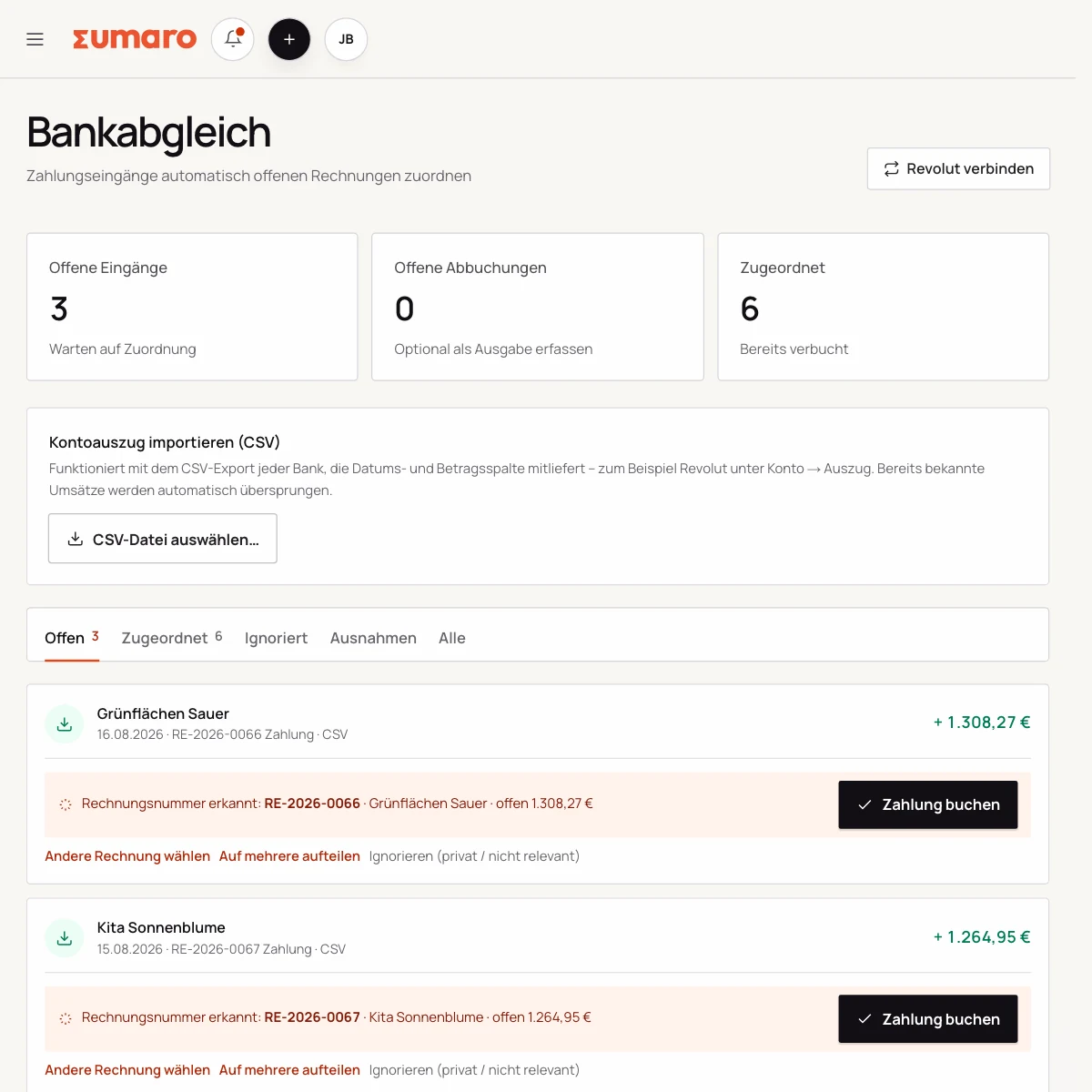
Sumaro matches unambiguous incoming payments itself; everything else stays a suggestion for you to review. And right before sending, the dunning run checks the payment status once more: money may have come in between the overnight planning and your approval later in the morning.

  • Unambiguous payments are matched
  • Rechecked right before sending
  • The history stays traceable
See the workflow
Bank reconciliation in Sumaro: transactions and receipts side by side
Finance cockpit · Time saved

Less follow-up work after every job. More time for your business.

Sumaro brings automation, AI help and a financial overview into one workspace. You copy less from one place to another and review the items where your decision really counts.

The actual time saved depends on your workflow. That is why you can measure it during the trial: time your current monthly routine once, then run the same client case in Sumaro and compare the review steps that remain.

AI help for estimates requires an enabled AI configuration. Sumaro deliberately describes automation and AI separately.

See Autopilot and the finance cockpit →
01

Recurring invoices

Sumaro creates due invoice drafts in advance, with service period and payment terms, for you to review.

02

Incoming payments

You import bank transactions as a CSV. Sumaro reconciles the imported transactions and matches unambiguous incoming payments to open invoices.

03

Reminders and dunning letters

The daily dunning run prepares the letters that are due. Nothing is sent until you approve it.

04

Receipts inbox

Receipts from the monitored mailbox are collected regularly in one place for review.

05

Financial bearings

Payment horizon, revenue gaps and an expected tax reserve show what matters next.

In short: Sumaro cuts the business follow-up work where it repeats every month. The Autopilot prepares plannable tasks, the AI helps with estimates, and the dashboard organizes incoming payments, open items, revenue gaps and the tax reserve. Critical steps deliberately stay reviewable, so you save time without giving up control.

In practice

What actually counts day to day.

Sort receivables by what needs doing

Not every overdue invoice needs the same message. A good morning starts with a list that shows due date, remaining balance, previous contact and client context. A short delay from a long-standing client can be handled differently from a large, disputed claim.

Sumaro helps you sort and provides templates. You decide whether a friendly reminder, a formal dunning letter or a personal conversation makes more sense first. That keeps automation a tool instead of turning it into an escalation that does not fit.

Dunning messages with context

A message comes across as fairer when it names the right invoice, the open balance and the original due date. With partial payments, the amount already received must be visible. A payment method and a contact person cut down on follow-up questions.

Record what was sent, the reply and the agreed next steps. If a client is granted a payment deferral, the new date is stored on the record. That way the next dunning run does not treat a situation you have already settled as a standard case.

From open amount to settled payment

After a payment is received, the open amount is recalculated. You check overpayments, fees and combined payments separately. The dunning status only ends once the case is fully settled.

If the client disputes the claim, you stop the automatic process and gather the facts. Larger or legally disputed claims belong in expert hands. Software can help by providing the history, not by replacing the decision.

Dunning that fits your client relationship

Create your own templates for your most common situations: a friendly payment reminder, a factual first dunning letter and a message after an agreed payment deferral. The wording stays flexible, while invoice, amount and deadline come from the record.

That way you do not have to start from scratch each time, but you keep control over tone and timing. For a small client relationship, that makes more sense than an entirely impersonal automatic routine.

Questions before you start

What you want to know before the trial.

No feature promise without context. Here is what Sumaro prepares, what you check and how getting started works.

Does Sumaro send dunning letters automatically?

Sumaro shows due and overdue receivables and prepares messages. You check the context, partial payments and tone before a dunning letter is sent.

Can I take a settled receivable out of the dunning run?

Yes. A payment, a deferral or a dispute is taken into account on the record. The decision stays with you, and settled cases are not pursued blindly.

The next step

Don’t let another open invoice vanish in your inbox.

Test your real receivables workflow: create an invoice, match a payment and prepare a reminder. Free for 30 days, with a controlled approval before anything is sent.