Skip to content
Document workflow

Create estimates and invoices – without entering data twice.

Client details, line items and terms are already in the estimate. Sumaro carries them forward when the job becomes an invoice and then a paid transaction.

  • Estimates with line items
  • Reuse your data
  • Track the status
Estimates with line items
Reuse your data
Track the status
Controlled approvals
The problem behind the problem

The job is accepted. Why type it in again?

Every duplicate entry costs time and opens the door to mismatched amounts, addresses or payment terms. Sumaro keeps estimate, invoice, sending and payment together in one traceable process.

How Sumaro solves it

Quote once, carry it forward cleanly, bill faster.

Step 01

Write estimates so the next step is clear

Structure services, quantities, prices and notes so your client understands the estimate quickly. Attachments and messages stay with the transaction.

  • Organize line items clearly
  • Your own payment and estimate texts
  • PDF for sending
See the workflow
Step 02

Record acceptance before the invoice is created

Document the status of the estimate and keep track of which jobs are still open, accepted or already billed.

  • Status on the document
  • Link client communication
  • Trace changes
See the workflow
Step 03

Keep working straight from the accepted estimate

Use existing line items as the basis for the invoice. Check the date of service, tax details and payment terms – then you send a consistent document.

  • Less duplicate entry
  • Your own number series
  • Track the due date afterward
See the workflow
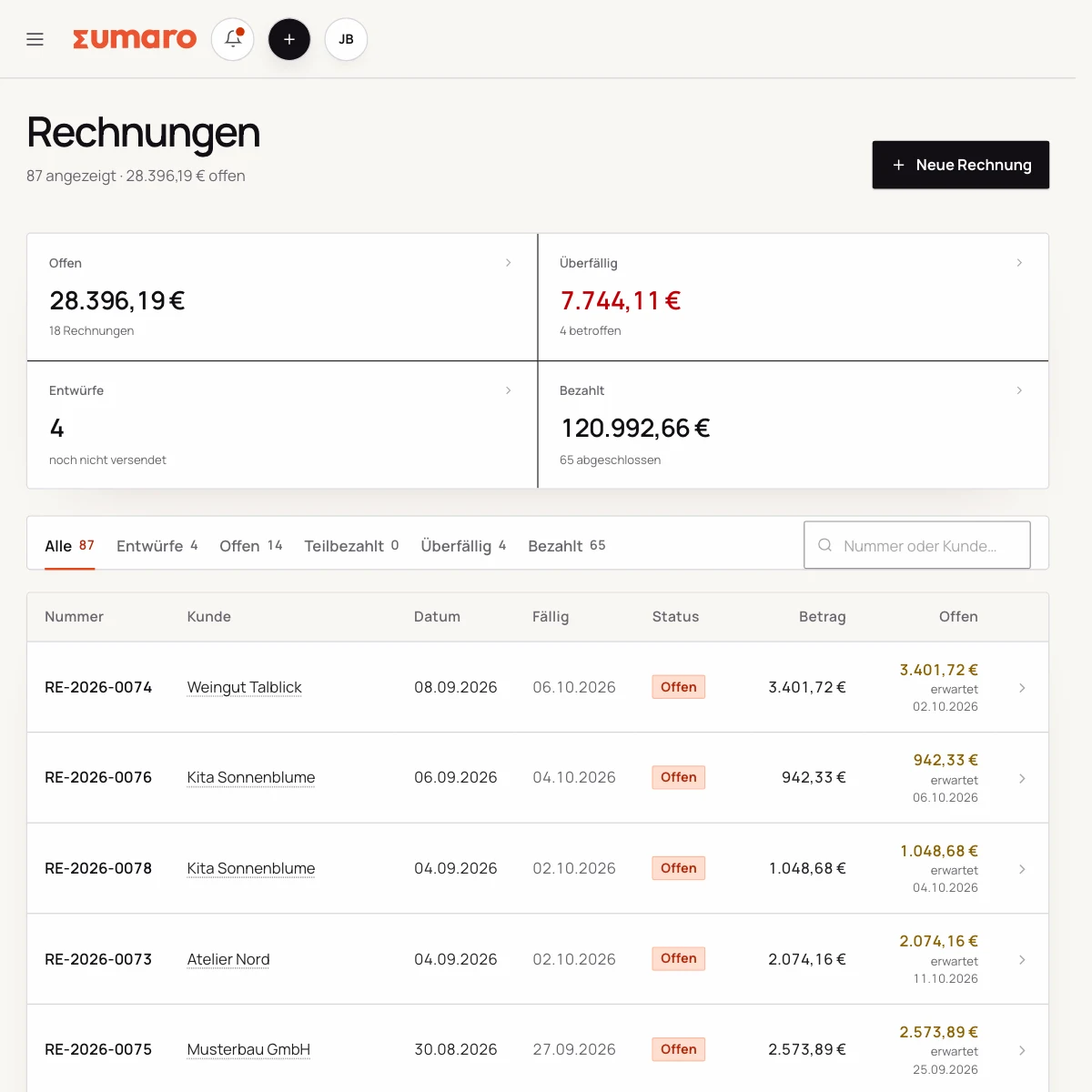
Sumaro invoice list with status, amounts and open items
Finance cockpit · Time saved

Less follow-up work after every job. More time for your business.

Sumaro brings automation, AI help and a financial overview into one workspace. You copy less from one place to another and review the items where your decision really counts.

The actual time saved depends on your workflow. That is why you can measure it during the trial: time your current monthly routine once, then run the same client case in Sumaro and compare the review steps that remain.

AI help for estimates requires an enabled AI configuration. Sumaro deliberately describes automation and AI separately.

See Autopilot and the finance cockpit →
01

Recurring invoices

Sumaro creates due invoice drafts in advance, with service period and payment terms, for you to review.

02

Incoming payments

You import bank transactions as a CSV. Sumaro reconciles the imported transactions and matches unambiguous incoming payments to open invoices.

03

Reminders and dunning letters

The daily dunning run prepares the letters that are due. Nothing is sent until you approve it.

04

Receipts inbox

Receipts from the monitored mailbox are collected regularly in one place for review.

05

Financial bearings

Payment horizon, revenue gaps and an expected tax reserve show what matters next.

In short: Sumaro cuts the business follow-up work where it repeats every month. The Autopilot prepares plannable tasks, the AI helps with estimates, and the dashboard organizes incoming payments, open items, revenue gaps and the tax reserve. Critical steps deliberately stay reviewable, so you save time without giving up control.

In practice

What actually counts day to day.

Scope of work and how changes are handled

An estimate holds up better when client and service provider expect the same result. Separate included work, assumptions and possible extra work. For a flat fee, examples and limits help; for hourly work, a time estimate, a rate and an approval process help.

If the scope changes, you create an addendum or a new estimate. The invoice can later refer to the version that was actually accepted. That keeps price changes explainable, and you do not have to quietly overwrite old line items.

Turning acceptance into a work order

Once the client says yes, they do not need another document marathon. Carry over names, line items and terms from the estimate and add only the date of service, invoice number and payment term. For partial projects, you mark which line items have already been billed.

The status shows whether an estimate is still open, accepted or invoiced. That keeps follow-ups, project start and invoicing on the same record instead of in three different lists.

A good estimate builds trust

Clients want to understand quickly what they get and how to start. A clear structure with result, scope, price, validity and next step looks more professional than a long text with no point of decision.

Sumaro supports the presentation and the step to the invoice. For complex contracts, liability questions or individual terms, a professionally reviewed contract remains the better complement.

The next step is in the document

An estimate should make replying easy: confirm by email, pick a date or send a question. When the next step is clear, you get a firm yes sooner and can start the project cleanly.

After acceptance, the original text stays on the record. That protects against misunderstandings if a line item is later changed, split or billed as additional work.

Questions before you start

What you want to know before the trial.

No feature promise without context. Here is what Sumaro prepares, what you check and how getting started works.

Can I turn an estimate into an invoice?

Yes. Client details and line items stay on the record, so you do not have to rebuild the invoice from an acceptance. Before sending, you check the final scope of work delivered.

What happens if the scope of work changes?

You can create a new estimate or a traceable addendum. The original version is kept, and the later invoice stays explainable.

The next step

Start with the job that’s still making work for you today.

Create an estimate, turn it into an invoice and track the payment. That way you experience Sumaro’s core benefit with your real workflow.