Skip to content
Everyday bookkeeping

Less month-end searching: income, expenses and payments in one place.

Sumaro connects outgoing invoices, expenses and bank transactions – and works out every night how much of your account balance is really yours after tax and reserves.

  • Income and expenses
  • Bank reconciliation
  • Monthly overviews
Income and expenses
Bank reconciliation
Monthly overviews
Controlled approvals
The problem behind the problem

Month-end shouldn’t mean piecing together scattered parts.

When receipts, bank transactions and invoices sit in separate places, reconciling them later takes more time than recording them did – and in between, you don’t know how much of the money in your account is actually yours to spend. Sumaro records the business connections where they arise.

How Sumaro solves it

While you work, your monthly overview takes shape.

Step 01

Capture receipts before month-end has to hunt for them

File expenses with date, amount, category and receipt. Clear matching helps with later review and handover.

  • Attach receipt files
  • Categorize expenses
  • Spot missing details
See the workflow
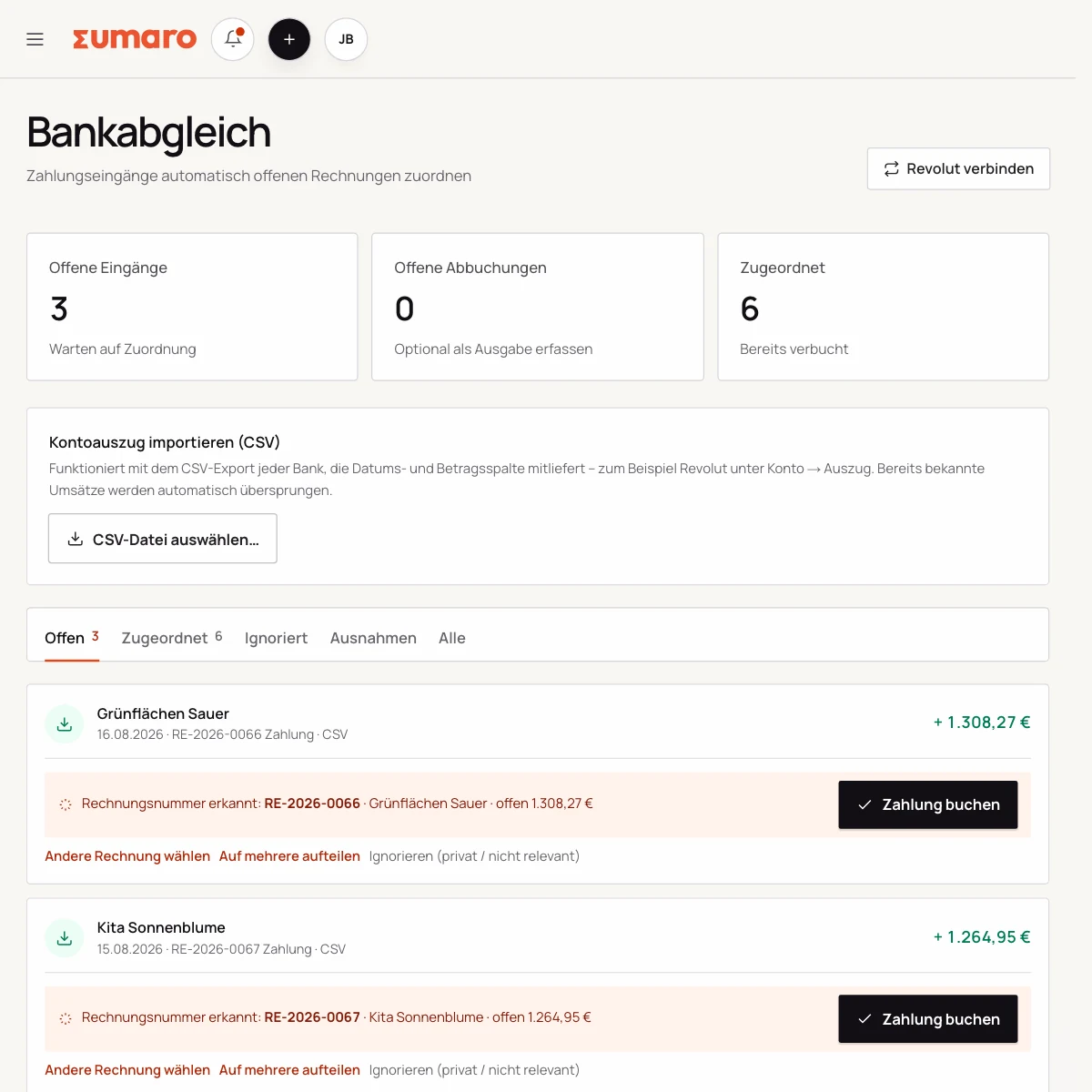
Bank reconciliation in Sumaro: transactions and receipts side by side
Step 02

Connect bank transactions and documents without going in circles

Bank transactions only become useful once it’s clear which transaction they belong to. Sumaro supports matching them with invoices and expenses. To be upfront: transactions from every bank come in as a CSV import – if the export includes a balance column, Sumaro also reads the account balance from it, as of the last import rather than live.

  • Find incoming payments
  • Match outgoing transactions
  • Keep exceptions visible
See the workflow
Step 03

Hand over to your tax advisor, prepared month by month

Overviews help you with ongoing checks and with preparing for your work with your tax advisor. They do not replace a professional review.

  • Summarize income and expenses
  • Export documents in order
  • Clarify anomalies before the handover
See the workflow
Finance cockpit · Time saved

Less follow-up work after every job. More time for your business.

Sumaro brings automation, AI help and a financial overview into one workspace. You copy less from one place to another and review the items where your decision really counts.

The actual time saved depends on your workflow. That is why you can measure it during the trial: time your current monthly routine once, then run the same client case in Sumaro and compare the review steps that remain.

AI help for estimates requires an enabled AI configuration. Sumaro deliberately describes automation and AI separately.

See Autopilot and the finance cockpit →
01

Recurring invoices

Sumaro creates due invoice drafts in advance, with service period and payment terms, for you to review.

02

Incoming payments

You import bank transactions as a CSV. Sumaro reconciles the imported transactions and matches unambiguous incoming payments to open invoices.

03

Reminders and dunning letters

The daily dunning run prepares the letters that are due. Nothing is sent until you approve it.

04

Receipts inbox

Receipts from the monitored mailbox are collected regularly in one place for review.

05

Financial bearings

Payment horizon, revenue gaps and an expected tax reserve show what matters next.

In short: Sumaro cuts the business follow-up work where it repeats every month. The Autopilot prepares plannable tasks, the AI helps with estimates, and the dashboard organizes incoming payments, open items, revenue gaps and the tax reserve. Critical steps deliberately stay reviewable, so you save time without giving up control.

In practice

What actually counts day to day.

Month-end as a small routine

Order does not start at the end of the month. Regularly check new receipts, match bank transactions and flag open invoices. On closing day, you then only check the few cases where amount, recipient or project is unclear.

An overview of income, expenses and open receivables makes the handover to your tax advisor easier to plan. It does not replace bookkeeping or account coding, but it delivers a complete working state instead of a pile of separate emails.

Linking receipts and bank transactions

When a debit matches a receipt, the match is prepared. If there are several candidates, the decision stays open. This deliberate check protects you from an automatic mis-posting that only surfaces weeks later.

The same applies to incoming payments: an invoice number in the payment reference is a strong signal, but combined payments and partial amounts must be split in a traceable way. The open item then shows the actual remainder.

Export with a clear boundary

Before a handover, you choose the period, clients and document types. Original invoices, e-invoice data and relevant receipts stay easy to find. Spot-check the export once and record which version was handed over.

Sumaro is a preparatory workspace for the self-employed. Tax assessment, retention periods and professional responsibility remain with you and your tax advisor.

Ready for the handover

Agree with your tax advisor which exports they need and how often. Then you set up your views and filing for that from the start, instead of hunting for missing files at year end.

A tidy workspace keeps current tasks, past documents and internal notes apart. That also makes a later switch or working with a new team member easier.

Questions before you start

What you want to know before the trial.

No feature promise without context. Here is what Sumaro prepares, what you check and how getting started works.

Does Sumaro help with month-end closing?

Sumaro brings receipts, bank transactions, income, expenses and open invoices into one overview you can check. Tax classification and the final bookkeeping stay with you and your tax advisor.

Who decides on matching a receipt or bank transaction?

Sumaro can prepare suitable matches. If a match is unclear or there are several possible matches, the decision stays open and you review it.

The next step

Test your next month-end without the searching.

Create a client, an expense and an incoming payment. Then you’ll see whether Sumaro makes your ongoing preparation easier – free for 30 days and with no contract.